Running A/B Experiments
The fractional operation can split users between arms of an experiment. This guide starts with the simple way to set one up, shows where it breaks, then shows a setup that doesn't.
Examples use test, control and excluded (users not in the experiment).
These names are a convention, not something flagd requires.
The simple (but possibly faulty) approach
One fractional with three arms.
Here 20% of users are enrolled, split evenly between test and control:
{
  "$schema": "https://flagd.dev/schema/v0/flags.json",
  "flags": {
    "checkout-experiment": {
      "state": "ENABLED",
      "variants": {
        "test": "test",
        "control": "control",
        "excluded": "excluded"
      },
      "defaultVariant": "excluded",
      "targeting": {
        "fractional": [
          ["excluded", 80],
          ["test", 10],
          ["control", 10]
        ]
      }
    }
  }
}
With no bucketing expression, flagd hashes [flagKey, targetingKey].
Users without a targetingKey get defaultVariant.
This works. Each user always gets the same arm, but changing the weights may change the arm a given user is in. This is a problem if, for instance, you want to change how many users are in the experiment.
How a user gets an arm
flagd hashes the bucketing value to a fixed point between 0 and 1. The weights cut that line into slices, in list order. The user gets the slice their point falls in.

The point never moves. The slices move whenever you change weights, add arms or reorder them.
Drawback: growing the experiment moves users
To enroll 80%, the obvious edit is 20/40/40.
Every user who was in test is now in control.
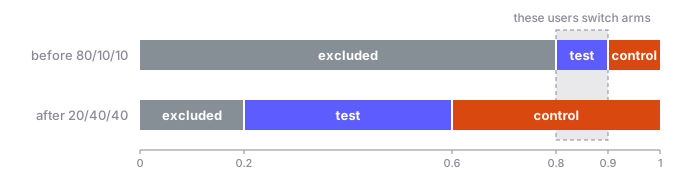
A flat split is fine if its weights never change. Otherwise, use the setup below.
Gate and split
Use two fractionals instead:
- a gate decides who is enrolled (
in/out) - a split decides the arm (
test/control)
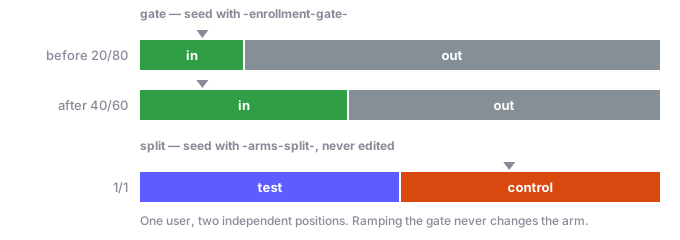
Each one hashes a different seed, so each user has two independent points.
To grow the experiment, change only the gate.
The in slice grows, and the split never moves.
{
  "$schema": "https://flagd.dev/schema/v0/flags.json",
  "flags": {
    "checkout-experiment": {
      "state": "ENABLED",
      "variants": {
        "test": "test",
        "control": "control",
        "excluded": "excluded"
      },
      "defaultVariant": "excluded",
      "targeting": {
        "if": [
          { "and": [
            { "!!": [{ "var": "targetingKey" }] },
            { "==": [
              { "fractional": [
                { "cat": [
                  { "var": "$flagd.flagKey" },
                  "-enrollment-gate-",
                  { "var": "targetingKey" }
                ] },
                ["in", 20],
                ["out", 80]
              ] },
              "in"
            ] }
          ] },
          { "fractional": [
            { "cat": [
              { "var": "$flagd.flagKey" },
              "-arms-split-",
              { "var": "targetingKey" }
            ] },
            ["test", 1],
            ["control", 1]
          ] }
        ]
      }
    }
  }
}
- Each stage needs its own seed, so each one uses an explicit
catexpression instead of the default. catdoesn't fail whentargetingKeyis missing: it returns a constant, so every user without a key would land in the same bucket. The!!guard skips them.inandoutare not variants. They are only compared by==.- The
ifhas no else. Users without a key and users gatedoutboth getdefaultVariant. - Ramping from 20% to 40% moves no one between arms, and new users split evenly.
Use different seeds
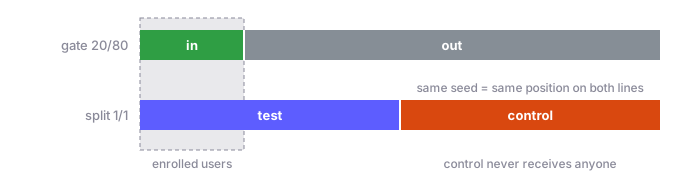
If gate and split hash the same value, a user sits at the same point on both lines.
Enrolled users all come from the low end of the gate, so here they all land in test.
Include $flagd.flagKey in both seeds too.
Without it, every flag using the same seed buckets users identically.
What not to change
The split's weights, seed and arm order, and the gate's seed, are part of the experiment. Changing any of them reassigns users. To restart an experiment on purpose, change the seeds. Moving a running experiment from the simple flag to gate and split reassigns everyone, so do it when you start a new iteration.
Ramping over time
Weights can be JsonLogic expressions.
Compute the gate weights from $flagd.timestamp to ramp enrollment without editing the flag:
["in", { "-": [{ "var": "$flagd.timestamp" }, 1767225600] }],
["out", { "-": [1768435200, { "var": "$flagd.timestamp" }] }]
Enrollment grows from 0% on Jan 1, 2026 to 100% on Jan 15, 2026.
Negative weights count as 0, so before and after the window the gate is fully out or fully in.
The split doesn't change, so no one moves between arms.